R histogram guide

How to Make a Histogram in R

R gives you two great ways to build a histogram: the built-in hist() function for a fast result, and ggplot2 for polished, publication-ready graphics. Both are shown below with copy-ready code, including how to set the number of bins and switch to relative frequency.

1. The base R hist() function

The hist() function is part of base R, so there is nothing to install. Pass it a numeric vector and it bins the data and draws the bars. The arguments below cover almost everything you will need day to day.
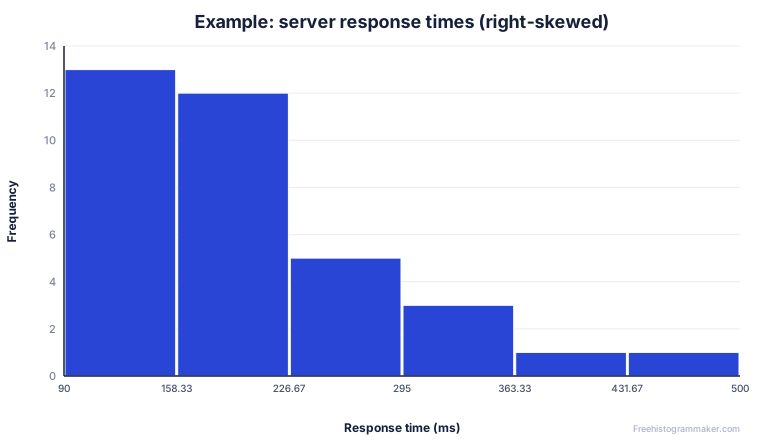
Example right-skewed histogram of server response times
Example output: a right-skewed distribution of response times.
R · hist()
# Basic histogram from a numeric vector
hist(data)

# A fuller, report-ready version
hist(data,
     breaks = 10,                # bins: a number or a method
     col    = "steelblue",       # bar color
     border = "white",           # bar outline
     main   = "Distribution of values",
     xlab   = "Value",
     ylab   = "Frequency")

The breaks argument is the one to remember: it controls how many bins you get. Pass a number for an approximate count, a vector of cut points for exact control, or a rule such as "Sturges" or "FD" (Freedman–Diaconis).

Choosing the number of bins in R

R does not always give you the exact bin count you ask for — with a plain number, breaks is treated as a suggestion and R rounds to “pretty” cut points. For exact bins, pass a sequence: hist(data, breaks = seq(0, 100, by = 10)) creates bins exactly 10 wide from 0 to 100. The built-in methods "Sturges", "Scott" and "FD" each apply a different rule of thumb; Freedman–Diaconis ("FD") is a good default for larger or skewed datasets because it adapts to the spread of the data.

Common errors with hist()

If hist() throws an error, the usual cause is that your input is not numeric — a factor or character column will fail. Wrap it in as.numeric() first, and remove missing values with na.omit() if needed. Another frequent surprise is the y-axis showing density rather than counts: that happens when you set unequal breaks, because R switches to density automatically. Add freq = TRUE to force counts.

A histogram from a frequency table in R

If you only have counts, you can rebuild the raw data with rep() — for example rep(c(5, 15, 25), times = c(3, 8, 12)) recreates three classes with 3, 8 and 12 observations — then pass that to hist(). For pre-binned data with bar heights you already know, barplot() with no spacing is often the simpler choice.

2. A nicer histogram with ggplot2

When the chart is going into a report or paper, ggplot2 is worth the extra line. Map your value to the x aesthetic and add a geom_histogram() layer.

R · ggplot2
library(ggplot2)

ggplot(df, aes(x = value)) +
  geom_histogram(bins  = 20,
                 fill  = "steelblue",
                 color = "white") +
  labs(title = "Distribution of values",
       x = "Value", y = "Count")

Use bins for a target number of bars or binwidth to fix the width of each bin in data units. To show proportions instead of counts, transform the y aesthetic:

R · relative frequency
# Relative frequency (proportions on the y-axis)
ggplot(df, aes(x = value)) +
  geom_histogram(aes(y = after_stat(count / sum(count))),
                 bins = 20) +
  labs(y = "Relative frequency")

No R installed? Try it in your browser

If you only need a chart and the summary numbers, you can skip the setup. Paste your values into the maker and download a PNG, SVG or CSV in seconds — useful for a quick check before you commit to code.

Open the free histogram maker

FAQ

R histogram questions

How do I change the number of bins in R?

Use the breaks argument in hist(), for example hist(data, breaks = 20). You can pass a single number, a vector of break points, or a method name such as "Sturges" or "FD". In ggplot2 use bins = or binwidth = inside geom_histogram().

hist() vs ggplot2 — which should I use?

hist() is built in and perfect for a fast look. ggplot2 takes one extra line to load but gives far more control over colors, themes, facets and legends, which is why it is the usual choice for publication graphics.

How do I overlay two histograms in R?

In base R, draw the first with hist(a, col = rgb(0,0,1,0.5)) then add the second with hist(b, col = rgb(1,0,0,0.5), add = TRUE) using semi-transparent colors. In ggplot2, map a grouping variable to fill and set position = "identity" with alpha = 0.5.

How do I save an R histogram as an image?

Wrap the plot in a device: png("hist.png"); hist(data); dev.off(). For ggplot2 use ggsave("hist.png", width = 7, height = 5).

Keep going

Related guides