Python histogram guide

How to Make a Histogram in Python

In Python, a histogram is one line away with Matplotlib’s plt.hist(), or with seaborn’s histplot() for prettier defaults. Below are copy-ready examples for a basic chart, a relative frequency version and a seaborn plot with a smooth curve.

1. Matplotlib: plt.hist()

Matplotlib is the standard plotting library. Give plt.hist() a list or NumPy array and it bins the values and draws the bars.
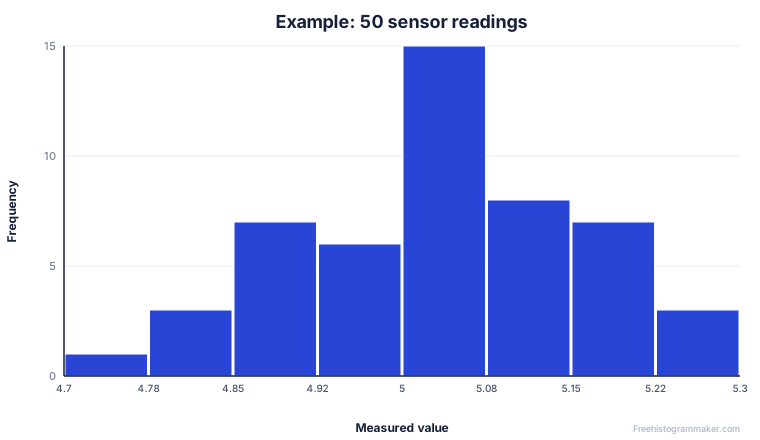
Example histogram of 50 sensor readings clustered around a central value
Example output: 50 sensor readings, roughly symmetric.
Python · matplotlib
import matplotlib.pyplot as plt

plt.hist(data, bins=20, color="steelblue", edgecolor="white")
plt.title("Distribution of values")
plt.xlabel("Value")
plt.ylabel("Frequency")
plt.show()

The key argument is bins. Pass an integer for an approximate number of bars, a list of edges for exact control, or a rule like "auto" to let NumPy decide.

Get the bin counts with NumPy

Sometimes you want the numbers, not just the picture. numpy.histogram(data, bins=20) returns two arrays — the counts in each bin and the bin edges — without drawing anything. That is handy for building your own frequency table, exporting to CSV, or feeding the counts into another chart. You can then pass the same bins array to plt.hist() so the chart and the table match exactly.

Choosing the number of bins

Too few bins flatten the shape; too many turn it into noise. A safe starting point is bins="auto", which uses the larger of the Sturges and Freedman–Diaconis estimates. For reproducible reports, set an explicit number such as bins=20, or define exact edges with bins=range(0, 101, 10) so every reader sees the same intervals.

Save the figure for a report

Call plt.savefig("histogram.png", dpi=300, bbox_inches="tight") before plt.show() to export a crisp, high-resolution image. Use a .svg extension instead for a scalable vector version that stays sharp in print.

Common Python histogram errors

Two issues come up often. First, passing a list that contains None or NaN values can distort or break the chart — filter them out first, for example with a list comprehension or data = data[~np.isnan(data)]. Second, forgetting plt.show() (outside a notebook) means the window never appears; in Jupyter the figure renders inline automatically.

2. Relative frequency (density)

To show proportions instead of raw counts, add density=True. The bars are scaled so the total area equals 1, which is what most statistics courses mean by a relative frequency or probability histogram.

Python · density
# Relative frequency: total area sums to 1
plt.hist(data, bins=20, density=True)
plt.ylabel("Density")
plt.show()

3. seaborn: histplot()

seaborn produces better-looking charts with less effort and can overlay a kernel density estimate in the same call.

Python · seaborn
import seaborn as sns

sns.histplot(data, bins=20, kde=True)  # kde adds a smooth curve
plt.show()

seaborn also makes grouped comparisons easy: pass a DataFrame and a hue column and it draws one overlaid, color-coded histogram per group, which is far more work to assemble by hand in plain Matplotlib.

Just need the chart?

If you are not in a Python environment right now, paste your numbers into the maker for an instant histogram, full statistics and a one-click PNG, SVG or CSV download.

Open the free histogram maker

FAQ

Python histogram questions

How do I set the number of bins in Matplotlib?

Pass bins= to plt.hist(). Use an integer for a count, a list for exact edges, or a string rule such as bins="auto" or bins="sturges" to let NumPy choose.

How do I make a relative frequency histogram in Python?

Add density=True to plt.hist() so the bars show a density whose total area is 1. For exact proportions, pass weights=np.ones(len(data)) / len(data).

Matplotlib or seaborn?

Matplotlib is the core library and gives you total control. Seaborn sits on top of it and produces nicer defaults with less code — sns.histplot() can even overlay a smooth KDE curve in one call.

How do I save the figure to a file?

Call plt.savefig("histogram.png", dpi=300, bbox_inches="tight") before plt.show() to export a high-resolution image for reports or print.

Keep going

Related guides