Free online histogram generator

Free Histogram Maker

Turn a list of numbers into a clean histogram in seconds. Paste or upload your data, choose how many bins you want, and download a publication-ready chart — free, no account, no watermark.

100% freeNo sign-upWorks on mobilePNG, SVG & CSVData stays in your browser
Histogram generator
commas, spaces or new lines
8
BarsBorder

Recent charts (saved on this device)

Paste your data and press Make histogram. Your chart, summary statistics and a full frequency table appear here.

Generate a chart to see an automatic read of its shape, skewness and a recommended bin count.

Summary statistics

Frequency distribution table

The bin-by-bin frequency table will appear here after you generate a chart.

Why this tool

A histogram maker that does the statistics too

Most free chart tools stop at the picture. This one gives you the numbers behind it, so you can actually understand your distribution.

Instant and free

Paste numbers and get a histogram right away. No paywall, no trial, and no limit on how many charts you create.

Real statistics

Every chart ships with mean, median, mode, standard deviation, quartiles and a full frequency table — not just bars.

Built for export

Download crisp PNG or vector SVG for reports and slides, or grab the frequency table as CSV for Excel and Sheets.

Frequency or relative frequency

Switch the Y-axis between raw counts and percentages, or feed in a ready-made frequency table for statistics homework.

Tune every detail

Adjust the bin count with a slider, recolor the bars, remove outliers and add axis titles until the chart says exactly what you mean.

Private by design

Your numbers are processed on your device and never uploaded. Recent charts are remembered locally so you can reopen them later.

Step by step

How to make a histogram in 4 steps

From a raw list of numbers to a finished chart, the whole process takes well under a minute.

  1. Add your data

    Type or paste your numbers in the box, separated by commas, spaces or line breaks. You can also upload a CSV or TXT file exported from Excel or Google Sheets.

  2. Choose your bins

    Leave Auto on to let the square-root rule pick a sensible number of bins, or drag the slider to group your data into wider or narrower intervals.

  3. Style the chart

    Switch to relative frequency, toggle gridlines, recolor the bars and add a title and axis labels so the chart is ready for your report.

  4. Download or share

    Save the chart as PNG or SVG, export the frequency table as CSV, or copy a share link that reopens the exact same chart on any device.

Tip: tidy data wins

The maker ignores blanks and non-numeric text automatically, so you can paste a whole spreadsheet column without cleaning it first. If your file has headers or extra columns, only the numeric values are used.

Exporting from Excel? Copy a single column of values, paste it in, and you are ready to go.

The basics

What is a histogram?

A histogram is a chart that shows how a set of numbers is distributed. The range of values is split into consecutive intervals called bins, and the height of each bar shows how many data points fall inside that interval. Because the bars sit directly next to each other, a histogram makes the overall shape of your data obvious at a glance — where values cluster, how spread out they are, and whether the distribution is symmetric or lopsided.
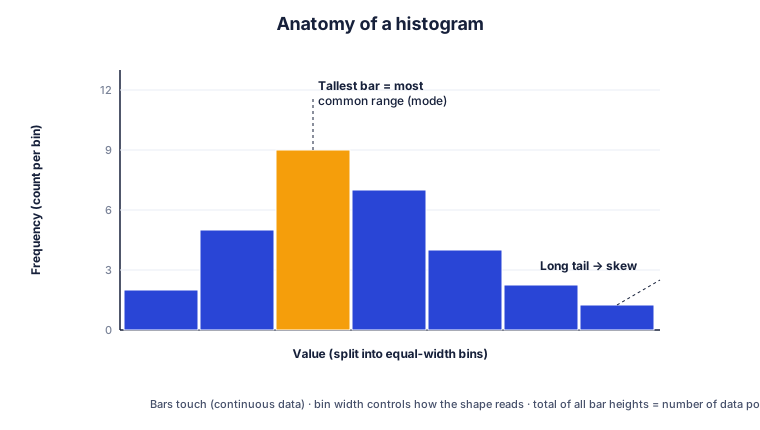
Labeled diagram of a histogram showing bins on the x-axis, frequency on the y-axis, the tallest bar as the mode, and a long tail indicating skew
A histogram splits values into equal-width bins; bar height is the count in each bin.

Histogram vs bar chart

It is easy to confuse a histogram with a bar chart, but they answer different questions. A bar chart compares separate categories — sales by country, votes by candidate — and the bars usually have gaps between them. A histogram works with continuous numeric data, the bars touch, and the order of the bars is fixed because the x-axis is a number line. If your x-axis is made of labels, you want a bar chart; if it is made of numbers grouped into ranges, you want a histogram.

How to choose the number of bins

The number of bins changes the story a histogram tells. Too few bins hide detail and the chart looks blocky; too many bins create a noisy, spiky shape. A common starting point is the square-root rule — take the square root of the number of data points and round up. Sturges’ rule (log₂n + 1) and the Rice rule (2 × n^(1/3)) are popular alternatives. This maker shows all three suggestions for your dataset so you can compare and pick whichever reads best.

Reading the shape of a distribution

Once your histogram is drawn, look at its silhouette. A roughly symmetric, bell-shaped curve points to a normal distribution. A long tail to the right is right-skewed, which is common for income or waiting times, while a long tail to the left is left-skewed. Two separate peaks suggest your data may be a mix of two groups. The maker measures skewness automatically and tells you what the shape implies, along with where the mean sits relative to the median.

When not to use a histogram

Histograms are powerful but not perfect. The same data can look very different depending on bin width, they hide the exact values inside each bar, and they struggle with very small samples. For tiny datasets a dot plot or stem-and-leaf plot can be clearer, and for comparing several groups side by side a box plot often works better. A good habit is to try two or three bin counts before settling on the chart you publish.

Where they are used

Who makes histograms, and why

Education & statistics homework

Students summarize exam scores, plot frequency distributions and complete assignments — whether the class uses a TI-84 calculator, SPSS or a free online maker like this one.

Business & analytics

Teams look at customer ages, order values, delivery times and response times to spot where most activity happens and where the outliers hide.

Science & research

Researchers show measurement distributions, lab results and particle sizes, or overlay flow-cytometry data in specialist tools such as FlowJo.

Quality control

Manufacturers check whether a process stays within tolerance, using the shape of the histogram to catch drift before it becomes a defect.

Step-by-step guides

How to make a histogram in any tool

Prefer to build it yourself in software you already use? These guides walk through every step, with the exact menus and code.

FAQ

Histogram maker questions, answered

Is this histogram maker really free?

Yes. Free Histogram Maker is completely free with no account, no trial and no watermark. You can build as many histograms as you like and download every one of them.

Do I need to install anything?

No. The tool runs entirely in your web browser, so it works on Windows, Mac, Chromebook, iPhone and Android without any download or plugin.

How do I make a histogram from a frequency table?

Switch the input mode to Frequency table, then enter one class per line as range, count — for example 10-20, 8. The maker turns those counts straight into bars. See the dedicated frequency histogram maker guide for more.

What is the difference between a frequency and a relative frequency histogram?

A frequency histogram shows raw counts on the Y-axis. A relative frequency histogram shows each bin as a percentage of the total. Tick Relative frequency (%) to switch between them instantly.

How many bins should a histogram have?

A good starting point is the square-root rule: take the square root of the number of data points and round up. Sturges' rule and the Rice rule are common alternatives. The tool shows all three suggestions for your dataset and lets you fine-tune with a slider.

Is my data uploaded to a server?

No. Your numbers are processed on your own device and are never sent anywhere. Recent charts are stored locally in your browser so you can reopen them next time, and you can clear them with one click.

Can I download the histogram for a report or slides?

Yes. Export a high-resolution PNG, a scalable SVG for print, or the frequency table as CSV to drop into Excel or Google Sheets.

Can I make a histogram on my phone?

Absolutely. The layout is mobile-first, so the data box, controls and chart all work comfortably on a small screen.

Common uses

What people use it for

A few of the everyday jobs this histogram maker is built to handle.

Statistics homework

Paste a set of exam scores or survey results, get the mean, median and standard deviation, and download a labeled chart for your assignment.

Lab & research reports

Turn measurements into a clean distribution, read the skewness automatically, and export the frequency table as CSV straight into your write-up.

Quick data checks

Drop in a column of numbers on your phone or laptop to see the shape of the data and spot outliers before any deeper analysis.